15 March 2015

MIDLAND ER presented 300 Outdoor Radio for hiking and camping

From the portable audio devices sector, we want you today the new MIDLAND ER imagine 300 outdoor radio that you, for example, when walking, can while camping, at the construction site or generally use on trips, because it is housed and cared for in a rugged housing itself with energy.

The new MIDLAND ER 300 outdoor radio is more specifically equipped with a solar panel and can make the sunshine stream that is stored in the built-in battery. If once sun does not shine, yet offers a second option available in the form of a hand crank. About this can also generate electricity.

In addition to its use as a regular radio are more useful functions, such as a flashlight and a mobile charger for USB devices from which you can recharge as smartphones. The built-in battery provides a capacity of 2000mAh available and the reception of radio program is held as usual via FM and AM frequencies.

The sound takes place via the built-in speakers and there is an additional jack for headphones available. The built-in flashlight is equipped with Cree LEDs that produce a brightness of 130 ANSI lumens. About the LCD display on the device, you can get a variety of information, including the time of day. If you have any problems once and you have to be saved, even has a built- ultrasound dog whistle available and also an SOS Morse code function.

The dimensions of the case are indicated with 192 x 86 x 57 millimeters in width, height and depth, with a weight of 470 grams. As price will be charged € 69.99 (RRP).Information about an IP standard of housing, we have not met.

Specifications and technique for MIDLAND ER 300 Outdoor Radio

  • Solar module
  • Hand crank
  • 2000mAh Battery
  • USB port for external devices
  • Headset connector
  • Speaker
  • AM / FM Radio
  • Flashlight with Cree LEDs and 130 ANSI lumens of brightness
  • LCD-Display
  • Ultrasonic Dog Whistle
  • SOS Morse code function
  • Dimensions: 192 x 86 x 57 mm width, height, depth
  • Weight: 470 grams
  • RRP 69.99 €

clip_image002

Source: Midland

Panasonic Nubo: First 4G-LTE surveillance camera available in early 2016

The Panasonic Nubo surveillance camera will be on pre-order, first in April in the UK, the Netherlands and the USA and will be delivered in Q4 2015. As a release date for Germany, however only called the 1st quarter 2016. Special features include the built-in 4G LTE modem via which the monitoring can be performed with high bandwidth. The built-in modem also supports low bandwidth GPRS, 2G and 3G in the surveillance.

The camera can be used for outdoor surveillance and there is a protective housing to IP66 standard before, so the camera is weatherproof. Other special features include added an intelligent recognition of individuals who can give an alarm function via the app. Furthermore, the camera can be combined with external sensors such as, for example, with door sensors or motion detectors and optional, it can be equipped for power supply with an external battery.

The recorded videos, audio files and images are stored in a cloud-based storage system that is protected by SSL encryption. It can be operated among others by tablet or smartphone via an app. What price the 4G surveillance camera will go into Germany at the start, however, was not mentioned.

Data Sheet and technology to Panasonic Nubo 4G Surveillance Camera

· Support of a mobile network (GPRS / 2G / 3G / 4G): Nubo will deliver outstanding connectivity with leading mobile operators. Is the first partner in Europe

· For outdoor use (IP-66): Nubo is weatherproof and can be used indoors as well as outdoors.

· Intelligent detection of persons: Nubos advanced video analytics allow easy detection, when people enter the restricted area, and remove the app an alarm.

· Sensor connectivity and home automation: Nubos wireless technology allows communication with external sensors such as door sensors or motion detectors.

· Battery life: Nubo can be equipped with an external battery that provides temporary use in places without electricity connection.

· Security: video, audio and images are automatically stored in a cloud-based storage system that is protected by SSL encryption to bank-level and encrypted passwords.

· On pre-order from April 2015 in the UK, Netherlands, USA

· Available: 1st Quarter 2016

· Price: Unknown

clip_image002

Source: Panasonic

Toshiba Portege Z20t-B-103: 2-in-1 Ultrabook with LTE radio 1999 €

The new Toshiba Portege Z20t-B-103 2-in-1 Ultrabook is composed of the two functions of a laptop and a tablet PC and it can vary depending on the mode to be used accordingly. In the notebook mode is a clip-on keyboard available, which can be disconnected in tablet mode. The dimensions of the matt black casing are indicated with 309 x 200 x 8.8 millimeters in tablet mode and with 309 x 215 x 21 millimeters in notebook mode.

For the operation of the keyboard is a 12.5-inch / 31.8-centimeter IPS Full HD touchscreen display is available, which is equipped with capacitive technology and can be used with up to ten fingers. The maximum resolution is given with 1920 x 1080 pixels and for the service, a digitizer or a digital pen is ready. The performance of the device receives via the Intel Core M-5Y51 processor, an Intel HD 5300 graphics chipset and 4GB of 1600MHz DDR3L memory.

The data memory is a fast 256GB SSD hard disk. The exchange of data can be done in addition to LTE (4G) also via Gigabit Ethernet LAN, WiFi 802.11 ac / a / b / g / n, 3G and Bluetooth 4.0. Other connections are available for micro-HDMI, Micro USB, MicroSD, RGB, HDMI and USB 3.0. On the back you will find before a 5-megapixel camera, while on the front is a full HD camera used. The operating system is preinstalled Windows 8.1 Pro in the 64-bit version.

Data Sheet and technology for the Toshiba Portege Z20t-B-103 2-in-1 Ultrabook

  • Display: 12,5 inch (31,8 cm) IPS Full HD 10 Finger capacitive Touch-Display (1.920 x 1.080) with Digitizer
  • Operating System: Windows 8.1 Pro, 64-bit (pre-installed)
  • Processor: Intel® Core ™ processor M-5Y51
  • Graph: Intel® HD Graphics 5300
  • Hard Drive: 256 GB SSD
  • Memory: 4 GB LP DDR3L (1,600 MHz)
  • connectivity: Micro-HDMI®, Micro-USB, Micro-SD™ (Tablet); RGB, HDMI®, 2x USB 3.0, Bluetooth® 4.0, WLAN 802.11 ac/a/b/g/n, 3G, LTE, GBit LAN (keyboard)
  • Webcam: Full HD (front), 5 MP (rear)
  • Dimensions: 309 x 200 x 8.8 mm (Tablet); 309 x 215 x 21 mm (Notebook); from 730 grams (Tablet) or 1,510 grams (Notebook)
  • Color: Matt Black
  • Price (. RRP incl. VAT): 1.999 €

clip_image002

clip_image004

Source: Toshiba

Toshiba Satellite Click L9W Mini-B-102 2-in-1 Convertible available in pearl white with tablet function from April

The new Toshiba Satellite Click L9W Mini-B-102 2-in-1 Convertible consists more precisely from a tablet PC and a notebook and can thus be used in both configurations. Keyboard is by-and-dock on or pinched and the design is kept in pearl white. In the area of equipment you this device offers a 8.9-inch / 22.6-inch WUXGA large touchscreen display with IPS technology that supports a resolution of 1920 x 1200 pixels. The operation can take place by 10-point multi-touch.

In terms of performance, an Intel Atom processor Z3735F is used, an Intel HD graphics chipset and 2GB of DDR3L memory. The internal flash memory is specified with 32GB eMMC and for networking, Wi-Fi 802.11 b / g / n, Bluetooth 4.0 and wireless display with on board. The memory can be increased via MicroSD memory card to another 128GB.Other connections are available for USB 2.0, SD card slot and audio devices.

For audio playback in stereo speakers with Dolby Digital Plus technology worry and there is a 2-megapixel HD webcam with microphone on the front for use. On the back there is to front a 5-megapixel camera with full HD Autofocus. The operating system is pre-installed Windows 8.1 update with Bing on board and the weight is given with only 470 grams in tablet mode or with 999 grams in notebook mode. All other information can be found in the datasheet to ensure compatibility before.

Data Sheet and technology for the Toshiba Satellite Mini L9W Click-B-102 2-in-1 Convertible

· Display: 8.9 inches (22.6 cm) WUXGA IPS display (1920 x 1200) with capacitive touch screen and 10 points multi-finger support

· Operating system: Windows preinstalled 8.1 Update with Bing

· Processor: Intel® Atom ™ processor Z3735F

· Graph: Intel® Graphics

· Hard Drive: 32 GB eMMC SSD

· Memory: 2 GB RAM DDR3L (onboard)

· Connectivity: WLAN 802.11 b/g/n, Bluetooth® 4.0, Wireless Display, Tablet: 1x Micro-HDMI®-out, 1 x Micro-USB, 1 x MicroSD ™ (up to 128 GB of expandable), 1x headphone / microphone (combo), Keyboard: 1x USB 2.0, 1 x SD ™ slot (up to 128 GB of expandable)

· Software: Microsoft® Office 365 staff (one-year subscription), Skype (60 minutes per month worldwide telephony), Toshiba TruCapture

· Sound: Dolby® Digital Plus™, Stereo speakers

· Web Camera: 5 MP with autofocus Full HD (rear), 2 MP HD with Integrated Microphone (Front)

· Dimensions: 235 x 161 x 9.8 mm (Tablet) / 235 x 170.6 x 19.9 mm (Notebook)

· Weight: Tablet: 470 grams / Notebook: 999 grams

· Color: pearl white

· RRP incl. VAT .: 399 €

· Available: April 2015

clip_image002

clip_image004

Source: Toshiba

10 March 2015

This is the new Apple MacBook: Retina resolution and only one connection

Apple also unveiled at the press conference alongside his SmartWatch a new MacBook model. As has been previously suspected, the device comes out with a 12-inch Retina display and with a single USB port, which replaces all previous interfaces.

In addition to new details on Apple Watch Apple today unveiled at his press conference a bold new device. The new MacBook dispenses entirely with a suffix - no air, no pro, no plus. It corresponds in equipment and optics almost exactly two months ago has become known leaks from 9to5Mac .

clip_image002

The new MacBook from Apple is smaller and lighter than its predecessor in every way.(Photo: Apple)

Extremely compact: The new MacBook now in 12 inches and with Retina display

The new device finally brings a Retina display with - had to wait a feature on the MacBook Air's customers. The display measures 12 inches diagonally and has a resolution of 2304 x 1440 pixels. Thanks to an extremely low frame around the display and the keyboard the base of the new model is extremely small. And even when the dimensions and weight as Apple has once again can save greatly. The new MacBook weighs less than a kilogram and is 24% thinner than the current MacBook Air - 1.3 millimeters at its thickest point. To realize the Apple has reduced the mechanics of the individual keys among others and "step-like" built up the MacBook battery so that it takes advantage of the extremely small volume of the notebook bottom perfectly.

clip_image004

The MacBook is only 13.1 mm thick at its thickest point. (Photo: Apple)

MacBook: Only a single connection

Most interesting about the idea but was certainly the confirmation of the rumor that Apple actually dispensed in the new MacBook on all previous interfaces, and this through a single USB Type C connector replaced. Use this port all data (video, peripherals, etc.) as well as the current required to enter into the device. When multiple devices connected simultaneously, then customers have to rely on future adapter or docking stations - a godsend for the accessories industry and a high price for the small form factor. Also, the built-in card reader without replacement. Only a normal jack for headphones and microphone is still available. The new USB connector is also reversible, so it can also be rotated 180 ° so that the "wrong" plugging longer possible. With this innovation, Apple closes the gap between the previous MacBook models and the tablet lineup. The model series MacBook Air and MacBook Pro will in future continue to exist and even get a small performance update.

The new MacBook is available from April 10 for 1300 US dollars

Interested parties must be able to wait until 10th Aril abide by the new MacBook in their hands. It will initially be two trim levels. The cheaper version will cost 1300 dollars. The improved model has a faster processor and a 512-gigabyte SSD for $ 1600 and comes into the trade.

Android 5.1 brings more stability and security

Android 5.1: Google finally supports dual SIM devices

Android 5.1 introduces support for innately smart phones with dual SIM function. Although there have been already devices that could use two SIM cards, the functionality needed to manufacturers to software page but integrate itself. It remains to be seen whether now more manufacturers will begin dual SIM smart phones manufacture.

clip_image002

Android 5.1: The new version of Google's operating system brings greater stability and better voice quality. (Source: Google)

If your smartphone or tablet stolen, you can lock it thanks to Android 5.1. This is now possible even if the thief who placed the device to factory condition. For the first time integrated Google also "High Definition Voice Calling". Therefore the voice quality when calling to be significantly improved. However, the system requires an appropriate device while facing. Using the quick settings you can register on Android 5.1 directly from a new Wi-Fi. In addition, associated with the device Bluetooth devices can now control it.

Android 5.1: Stability supposed to have been improved

Some users of Android 5.0 Lollipop  have complained about stability problems. The two updates to 5.0.1 and 5.0.2 do not seem to fix these problems altogether. It is hoped that Android 5.1 finally means for the affected users for help.

At least the units of the Nexus series should soon get the update. Very impatient can get the software as a factory image of Google's Android site  download - at least when a Nexus 5 , Nexus 10 or the 2012 Nexus 7 have in the wireless version. All others will have to wait a bit.

Google: Android 5.1 Lollipop will be published shortly

With luck, Google is already Android 5.1 for the devices of the house Nexus series free, it indicate the current time at any rate, more and more signs point. With this appointment would leave Apple with the keynote for Apple Watch least not alone the day.

Much to be better with Android 5.1 lollipop, so should return among other things, probably the most well-known silent mode. And otherwise many improvements will be found in detail whether these are useful, however, will only show in the tests. Users of Android One in Indonesia and India were already in the enjoyment of the new system, therefore we must also assume that the update older devices such as the Nexus 7 2012 should do something useful again.

A tangible indication of the imminent release of the updated website is in the Nexus factory images and also the telecommunications provider T-Mobile has provided in-house website for the Nexus devices with an update. In addition, also appeared in the issue tracker on the testimony of a Google-Developers, which states a bug that this Android 5.1 (API 22) is fixed and should be the release shortly. Precise information on the current release, there is not, however, for this theory comes from Artem Russakovskii of Android Police.

clip_image002

Source: Google+

Hannspree HANNSpad SN14T72B: 13.3-inch tablet comes with full HD resolution

Brought Hannspree just days ago the new HANNSpad SN14T75B on the market, will be presented soon another Android tablet. The Hannspree HANNSpad SN14T72B to convince with its large 13.3-inch display and cost about 260 euros here.

While abound on the market only as of Android tablets 7- to 10.1-inch class, larger units are usually hard to find. In the near future Hannspree is therefore publish a new 13.3-inch tablet called HANNSpad SN14T72B, the display will dissolve quite sharply with 1920 x 1080 pixels. Inside is a 1.6 GHz faster potter Quad-core processor and it will likely come from rock chip and has access to 2 GB of memory. The 16 GB internal memory measured coincides with a size of 16 GB of pretty average, an extension is possible thanks to the built-in microSD slots available, however. In addition there are two 5- and 2-megapixel camera, a powerful 8000 mAh battery, and Android version 4.4 KitKat.

Due to the large display, the Hannspree HANNSpad SN14T72B falls with a weight of 940 grams not easy out, the dimensions of 326 x 215 x 9 mm cannot act too compact device. There is next to the microUSB port and a mini HDMI output jack, over which the tablet can be connected to the TV.

Since all traders who trick the Hannspree HANNSpad SN14T72B, still speak of an unknown delivery date, it is difficult to make a statement about the release date of around 260 euros expensive tablets. Personally, however, I am assuming that we will get introduced to the device by the end of the month.

clip_image002

Archos 70 Archos cesium and sighted 55 Helium 4G

Although the MWC in Barcelona has closed its doors a few days ago, the French manufacturer Archos two new devices in the hindquarters seems to have. While 70 Cesium is a small Windows Tablet at Archos, the 5.5-inch Archos 55 Helium 4G brings phablet with support for LTE wireless standard.

clip_image002

Archos 70 Cesium

The Archos 70 Cesium is to extend the already established by the Archos 80 Cesium series of Windows tablets and comes with a 7-inch display, therefore, that with only 1024 x 600 pixels will dissolve. An Intel Atom quad-core generation of the Bay Trail will be used, the memory will probably measure only 1 GB. Also relatively small falls from the internally available memory - 16 GB of data can be stored here, a microSD slot for expansion, however, is ready.

Finally, the Archos 70 is cesium, which is to come on the market at an affordable price of 79 euros, have a 2 and a 0.3-megapixel camera and a 4,000 mAh battery.

clip_image004

Archos 55 Helium 4G

The second sighted device is the Archos 55 Helium 4G, a new entry-level phablet, that aims to build 179 euros. The 5.5-inch IPS display with a resolution of 1280 x 720 pixels and a Qualcomm Snapdragon 410 quad-core potters in the interior combined with 1 GB of RAM. Again, to measure 8 GB of internal memory expandable, the installed cameras make it go up to a resolution of 8 and 2 megapixels. Otherwise, there is a 2,820 mAh battery strong, the waiting LTE support, and Android version 4.4 KitKat.

When Archos will officially present the two devices is not clear at this time. I would expect but with a presentation over the next two months.

Installing Windows 10 on the HP Stream 7 Tablet

clip_image001

The HP Stream 7 is a reasonably priced, but quite powerful tablet that with Windows 8.1 with Bing is delivered. At present it is in Microsoft Store to get it for only 99 euros.

On this tablet is the current Technical Preview of Windows will install 10 and it runs really smooth. Unlike other low-cost Windows Tablets HP provides all the necessary drivers for download, you need to support touchscreen, motion sensor, Wi-Fi, Bluetooth, etc..

However, you should keep a few tricks. Just download the ISO image of Windows 10, mount and setup click does not work. Windows 8.1 with Bing is a compressed operating system and cannot easily be replaced by another.

That you need to install Windows 10 on the tablet:


  • Two 4 GB USB Sticks
  • USB OTG cable to connect a USB-sticks on the Micro USB port of your tablet
  • Keyboard, mouse and USB hub or keyboard with built-in USB hub (during installation can be a long time the touch screen to operate)
  • German-speaking ISO file Windows 10 Technical Preview (x86)
  • All required drivers from HP (except 'Order Recovery Media ")
  • Freeware Rufus
Create Recovery Media

First you need from the existing operating system recovery media are applied to the original Windows restore in the event that something goes wrong, can 8.1.

Control on Large Icons switch and restore tap. On the next screen, then create recovery drive select.

Now connect a USB stick to the USB OTG cable and follow the instructions on the screen. It desperately needs a USB flash drive, memory cards are not supported.

This process takes a while. Best tablet equal to hang from the charger to the battery is fully during the reinstallation of Windows 10.

Create a bootable USB stick with Windows 10 TP

While the tablet applies the recovery disk, you can create parallel on the PC a bootable USB stick with Windows 10, which may take several minutes.

Since the tablet has no classical BIOS, but boots on UEFI, you need the freeware Rufus, to create a UEFI bootable USB stick. For the second USB stick is needed because the HP Stream 7 can not boot from memory card. Unfortunately, this does not every stick, as experience showed. It is best to take a 4 GB stick and no larger.

clip_image002

In Rufus in Create Bootable drive with the option select ISO image and select it using the button right next to the ISO file of Windows 10 Technical Preview. Here are the 32-bit version must be used 64 bit does not work.

Then select the top of the window Rufus following options: GPT partitioning scheme for UEFI computer , FAT32 , 4096 bytes . Then click on Start button and wait.

If the USB stick is finished, copy the downloaded HP driver on the stick. Since the download files only have numbers, best create individual folders with meaningful names for the different device driver on the USB stick.

Prepare BIOS

While the PC created the USB flash drive, the BIOS of the tablets can be already prepared for booting from USB. For this purpose, turn off the tablet and when turned on when the screen is slightly brighter, even before the HP logo appears, press the 'Leiser' button briefly. Now, a new menu in text mode and a small-screen keyboard to this to use with touch screen.

clip_image004

F10 key and setup in the BIOS under System Configuration / Boot Options , selectSecure Boot on Disabled place. Then, select Clear All Secure Boot Keys select. Here, a displayed number combination for security must be entered using the onscreen keyboard.

clip_image006

Save these settings in the BIOS, exit the BIOS and try to turn on the tablet.

Installing Windows 10

Now the USB hub must be connected via the OTG cable to the hub and the keyboard, mouse, and the bootable USB stick.

Then turn on your tablet again and press the 'Leiser' button. In F9 press for the boot manager appears.

clip_image008

If here the USB flash drive is missing, something went wrong when creating, eg incorrect partitioning scheme or file system.

Select the USB stick with the keyboard Enter key. Experience has shown that not every keyboard nor any USB hub works - so use other devices in doubt.

When the installation program is launched, select the German language, accept the license agreement and then Custom select. The upgrade installation works withWindows 8.1 with Bing not.

The next step is to select the large primary partition and on Next button. The next installation steps simply confirm.

The tablet will reboot. Then, a few basic settings must be made and a local user account to be created. Until now, the surface can only control with keyboard and mouse.

Windows 10 starts with the new classic desktop. As stated by Microsoft announced, are smaller tablet, previously with Windows 8.1 running, keep the classic desktop after the upgrade. Only new devices with screens smaller than 8 inches to get the new Windows 10 version 'for phones and small devices' without classic desktop.

Installing the Driver

Now with the Explorer the driver files from the USB stick on the tablet, eg in the download directory, copy.

All drivers must then be successively installed. In this case, the driver pack start (sp70337.exe). Some of the drivers, the tablet must be rebooted after installation.

Second, it makes sense to install the two Controller driver (sp69305.exe and sp69308.exe). Thereafter, the touch screen and USB hub works can be removed together with keyboard, mouse and USB stick.

Successively install all the drivers, besides wait to install the next always, until the previous one is completely installed and restart the tablet at the corresponding messages.

Produce Finally, Wi-Fi connection and Settings / Accounts register the native Microsoft account. During installation, the tablet was due to lack of network drivers offline and has initially created a local user account, which, inter alia, the synchronization OneDrive and the Windows Store cannot be used.

Until now, Windows 10 works on the HP Stream 7 easily. The 10 stronger again came to the fore in Windows classic desktop is a bit strange. Personally I use on the tablet, the Modern UI interface prefer.

MSI AP16 Flex: New All-in-One PC in a slim format for 599 €

The new MSI AP16 Flex All-in-One PC is housed in a compact package and has a 15.6-inch / 39.62-inch touchscreen display at that supports HD resolution of 1366 x 768 pixels. The operator can therefore also be done with your fingers on the touch-typing.

In terms of performance, an Intel Celeron J1900 quad-core processor is used, provides the clock frequencies of 2.0GHz to 2,42GHz, and 4GB of RAM. The configuration in this respect should be enough for office and multimedia content, while probably not enough to graphics performance for complex games. Alternatively, the All-in-One PC be increased, up to 8GB of DDR3 RAM. The internal memory capacity is 64GB or 128GB depending on the model of SSD storage space or there is a larger but slower 320GB HDD hard disk for use.

The alternatives are a 3-in-1 card reader on board, USB 2.0, USB 3.0 and Gigabit Ethernet LAN. The wireless exchange of data can be done via Wi-Fi 802.11ac and Bluetooth 4.0. Also on board is a HD webcam, on which you can video chat and stereo speakers for audio playback. The case weighs in approximately two kilograms and a better orientation on the desk, there is added an adjustable stand.

The cooling is different from regular desktop PCs rather than passive and thus does not generate noise during operation. The dimensions are 382 x 264 x 25 millimeters in width, height and depth and the power supply is a 40 watt adapter instead.

Specifications and technique for MSI AP16 Flex All-in-One PC

· 15.6 / 39.62-inch touchscreen display, 10-point touch, 1366 x 768 pixel resolution

· Intel Celeron J1900 quad-core processor with 2.0 GHz clock speed to 2.4GHz

· 4GB RAM (Maximal 8GB)

· 64GB / 128GB SSD storage or 320GB HDD Hard Drive

· 3-in-1 card reader, USB 2.0, USB 3.0, Gigabit Ethernet LAN

· WLAN 802.11ac, Bluetooth 4.0

· HD-Webcam

· Stereo speakers

· Passive cooling

· Flexible Stand

· Dimensions: 382 x 264 x 25 mm width, height, depth

· 40 Watt Power Supply

· Weight: 2 kg

· Available: April 2015

· Price: € 599

clip_image002[4]

Source: MSI

Kingston Fury and Predator: DDR4 memory up to 3000MHz clock speed

The new Fury DDR4 memory will be on sale in different versions, either with 2133MHz, 2400MHz and 2666MHz on clock frequency. They are designed for motherboards with the Intel X99 chipset or been optimized for Haswell-E processors and will be offered in kits of 8GB to 64GB. All new kits are designed for quick 6- and 8-core processors from Intel and should bring a noticeable improvement in the speed with it.

The memory work with a low 1.2-volt and are equipped with a low-profile heatsink. The design is in black PCB. The CAS latencies of memory are indicated with CL14 CL15-and the operating temperature should be between 0 to 85 degrees Celsius. All other technical specifications regarding the individual stores, can be found in the datasheet to ensure compatibility before.

In addition to the Fury series Kingston has also introduced the Pedator DDR4 RAM to be used primarily in sophisticated systems. The memory will be available in kits with 32GB and 64GB capacity and there are clock frequencies up to 3000MHz possible. Again, we have the technical sheet further added you down to the article.

Specifications and equipment to the Kingston Fury DDR4 working memories

  • Easy to install: Plug-and-Play
  • Automatic Overclocking higher speed and capacity, easy to install, with no changes in the BIOS
  • Cost-effective: the perfect combination of price and performance DDR4
  • Unique: with the typical asymmetric FURY heatsink
  • Style: Black low profile heatsink and color matching PCB
  • Reliable: 100% factory tested
  • Compatible: tested with all popular motherboard types
  • Warranty: lifetime warranty, free technical support
  • Capacity: Kits with 8 GB, 16 GB, 32 GB and 64 GB
  • Clock Speed: 2133 MHz, 2400 MHz, 2666 MHz
  • CAS- latencies: CL14-CL15
  • Voltage: 1.2V
  • Operating temperature: 0 ° C to 85 ° C
  • Storage temperature: -55 ° C to 100 ° C
  • Dimensions: 133.35 mm x 34.24 mm
  • Compatible with Intel X99 chipset

· Specifications and equipment to the Kingston Predator DDR4 working memories

  • Fast: lowest latencies in combination with higher clock frequencies for unbeatable performance DDR4
  • Unique: carbon black heat sink with black PCB for dramatic look in any system
  • Compatible: for Intel X99 motherboards Intel XMP-ready optimized profiles
  • Reliable: 100% factory tested speed
  • Warranty: lifetime warranty, free technical support
  • Capacities: 16GB-64GB kits
  • Clock Speed: 2133 MHz, 2400 MHz, 2666 MHz, 2800 MHz and 3000 MHz
  • CAS- latencies: CL12-CL15
  • Voltage: 1.2V-1.35V
  • Operating temperature: 0 ° C to 85 ° C
  • Storage temperature: -55 ° C to 100 ° C
  • Dimensions: 133.35 mm x 55 mm
  • Compatible with Intel X99 chipset

clip_image001

clip_image003

Source: Kingston Technology

04 March 2015

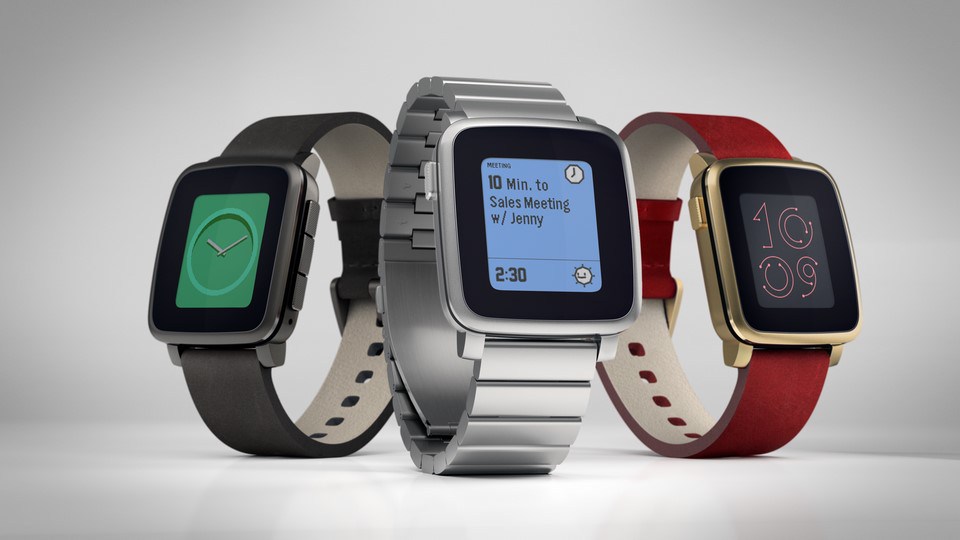
Pebble Time Steel: The colored Smart Watch now in the luxurious look

clip_image002

Only recently Pebble has some records broken with the launch of their new SmartWatch, the Pebble Time on Kickstarter within a day . But now she lay again after and bring new Pebble time in the "Steel" look to the market. The Pebble Time Steel is also about the same Kickstarter project and offers even more battery power than the little sister of plastic.

Pebble Time Steel


The difference between the time and the Pebble Pebble Time Steel is mainly in the exterior, stainless steel instead of plastic get to the train and the display cover is made of Gorilla Glass 3. The clock is about 1mm thicker than the plastic version. There are, however, additional battery life. The Pebble Time should already hold the inventors seven days so according to the Steel version it is even create their ten.

clip_image004

Different variants of the Pebble Time Steel.

Modular Smartwatch

The Pebble Time Steel is available in three colors: silver, black or gold are available, then one must still choose a matching bracelet made of leather or metal. They are interchangeable and are doing even an interface for clock have. In add-on modules or batteries could then be connected and smart traps. Thus, the Pebble Steel would also provide modular SmartWatch, probably a novelty! Pebble it is working together with several manufacturers to develop smart traps. The first modules will be available later this year.

clip_image006

Pebble Time Steel in Gold

Toshiba unveils NFC FlashAir III SDHC memory cards with wireless function

The new Toshiba FlashAir III NFC SDHC memory cards , however, do not build on the WLAN standard on how at Eye-Fi memory cards, but it is the NFC (Near Field Communication) is used, which is already in many modern Smartphones and tablet PCs finds. Accordingly, easy and can be done quickly, the wireless exchange of data. It has been more precisely an NFC chip of Type 3 day Default category installed, operating at a frequency of 13.56 MHz.

The FlashAir III memory cards belong to the class of 10 velocity and will be offered in three capacities with 8GB, 16GB and 32GB. For the communication or data exchange, the Memory Card Preview app is provided which can be used, among other things with iOS and Android devices. To access data through the web browser, WebDAV support is available, which is designed for Mac computers and Windows PCs.

Another special feature of the memory card offers an Internet pass-through feature that you can connect to the Internet via a separate wireless router to upload photos and videos to the web high. The manufacturer’s warranty covers five years. The memory cards will be available in stores from early March. Exact prices for the launch has not called in the wake of the announcement.

Specifications and equipment to the Toshiba FlashAir III NFC SDHC memory cards

· NFC (Near Field Communication) Technology

· NFC chip Type 3 day Default on 13.56MHz frequency

· Class 10 speed

· Capacities: 8GB, 16GB, 32GB

· Compatible with Android, iOS, Windows and Mac systems

· Memory Card Preview app for iOS / Android devices

· Web browser (WebDAV support)

· Internet-Pass-Through-Function

· 5 years warranty

· Available: March 2015

clip_image002

Source: Toshiba

Toshiba Satellite P50-B-11M notebook with UHD- and 3D function available

The new Toshiba Satellite P50-B-11M notebook comes with a 15.6-inch / 39.6-inch TruBrite large Full HD IPS display at the start, which supports a resolution of 1920 x 1080 pixels. The panel is also equipped with a LED backlight and has an aspect ratio of typical 16: 9. About the HDMI interface provides the notebook provides a 4K UHD support. Accordingly, contents in quadruplicate HD resolution can be output to TVs and monitors. A 3D function for playback of 3D content is also included with.

The performance of the notebook gets on the Intel Core Quad-core processor i7-4720HQ the fourth generation. This offers 6MB 3nd level cache, a clock frequency of 2.6 GHz and a Turbo Mode feature that allows the clock frequency can be ratcheted up to 3.6 GHz. For multimedia and games is a powerful AMD Radeon R9 M265X graphics card with 2GB of GDDR5 graphics memory on board and also 16GB of DDR3L memory.

For data storage functions a hybrid hard drive, resulting from 1000GB HDD storage capacity of 8GB of flash memory. For the wireless exchange of data-Fi 802.11 a / b / g / n / ac and Bluetooth 4.0 are available. The operating system is almost as common Windows 8.1 in the pre-installed 64-bit version is used.

Data Sheet and technology for the Toshiba Satellite P50-B-11M notebook

  • Display: 39.6 cm (15.6 inches) TruBrite® Full HD IPS High Brightness display with LED backlight and 16: 9 aspect ratio, resolution: 1,920 x 1,080
  • Operating System: Windows 8.1, 64-bit (pre-installed)
  • Processor: Intel® Core ™ processor i7-4720HQ the fourth generation Intel® Turbo Boost Technology 2.0 (2.60 / 3.60 Turbo GHz, 6 MB 3rd level cache)
  • Graphics: AMD Radeon ™ R9 M265X graphics with 2GB of dedicated GDDR5 VRAM
  • Memory: 16 GB (8 GB + 8 GB) RAM DDR3L, Hybrid HDD 1 TB (5,400 U / min) S-ATA + 8 GB flash memory
  • Connectivity: Wireless ac + a / b / g / n, Bluetooth 4.0 + LE
  • 4x USB 3.0 (1x incl. Sleep-and-Charge charging function of external devices when switched off)
  • HDMI® out with UHD 4K support and 3D function
  • RRP incl. VAT .: 1,349 EUR

clip_image002

clip_image004

Source: Toshiba

Asus Zenbook Ultrabook UX305FA with qHD + display available

The new  Asus Zenbook Ultrabook UX305FA goes into all facets with an Intel Core processor M-5Y10 at the start, which provides a clock frequency of 2.0 GHz. There is added an Intel HD graphics chipset and 8GB of DDR3-1600MHz memory. The data memory is used, depending on the model, a 128GB SSD hard drive or even a 256GB SSD hard drive.

As of now, there are models with a 13.3-inch / 33.7-inch IPS display large and antireflection to buy that support full HD resolution of 1920 x 1080 pixels. This March, the product range is extended to include also 13.3-inch / 33.7-centimeter devices with QHD + inch displays that support a resolution of 3200 x 1800 pixels.

Additional technical features of all models includes add a card reader, a micro HDMI port, 3x USB 3.0 and audio ports for headphone and microphone. The wireless exchange of data is possible via Bluetooth 4.0, Wi-Fi 802.11ac and WiDi. Alternatively, you can also use the included VGA / LAN adapter for networking. Video chats can be run via the built-in frame HD webcam and the power supply takes place over a 3-cell battery instead of 45 watts.

The dimensions of the case fall with 324 x 226 x 12 millimeters from, at a weight of 1.2 kg. The operating system is Windows 8.1 comes in 64-bit Edition for use and the warranty covers two years Pick-up & Return Service in Germany and Austria.

Data Sheet and technology for the Asus Zenbook Ultrabook UX305FA

  • Processor: Intel® Core ™ M-5Y10 processor (up to 2.00 GHz)
  • Chipset: without chipset (System on a Chip / SoC)
  • Memory: 8192MB DDR3 1600MHz (1x 8GB of onboard)
  • Display:33,7cm (13,3“ – non-reflecting – IPS – QHD+ – 3200 x 1800) [UX305FA-FB003H;  UX305FA-FB006H]
  • 33,7cm (13,3“ – non-reflecting – IPS – FHD – 1920 x 1080) [UX305FA-FC005H;  UX305FA(MS)-FC062H]
  • Graph: Intel® HD Graphics
  • Hard disk: 128GB SSD [UX305FA-FB006H,  UX305FA(MS)-FC062H]
  • 256GB SSD [UX305FA-FB003H; UX305FA-FC005H]
  • Network: Wi-Fi 802.11 a / c - WiDi
  • Interfaces: Card Reader - Micro HDMI - 3 x USB 3.0 - headphones / microphone combo jack - Bluetooth
  • Webcam: HD Webcam
  • Battery power supply: 3-cell 45 Wh - 45 Watt
  • Operating System: Windows® 8.1 - 64 bit (OEM)
  • Dimensions: 324 x 226 x 12 mm
  • Weight: 1.20 kg
  • Color: Obsidian Stone, Ceramic Alloy, Gold
  • Special Features: Audio by B&O ICE Power – Bluetooth – Multi-Touchpad – Instant On – Intel®
  • Wireless Display – ultra-slim Aluminium
  • Design - USB 3.0 - VGA / LAN adapter - Protective pouch
  • Service: 24 Months Pick-up and return service within Germany & Austria

clip_image002

clip_image004

Source: Asus